 debpalashandClaude Opus 4.8
f92e4223db
debpalashandClaude Opus 4.8
f92e4223db
Update the exact-version / minor / ROCm pin examples in the Docker Hub
overview (deploy/dockerhub-overview.md — source of the hub.docker.com page,
re-synced on this main push) and docs/install/docker.md to the v0.4.0
release. GHCR's package page inherits the repo README and the current
org.opencontainers.image.description label, both already accurate.

Co-Authored-By: Claude Opus 4.8 (1M context) <noreply@anthropic.com>
7.7 KiB
OmniVoice Studio
The open-source ElevenLabs alternative. Real-time dictation, zero-shot voice cloning, and cinematic video dubbing — fully local, no API keys, no accounts. 646 languages.





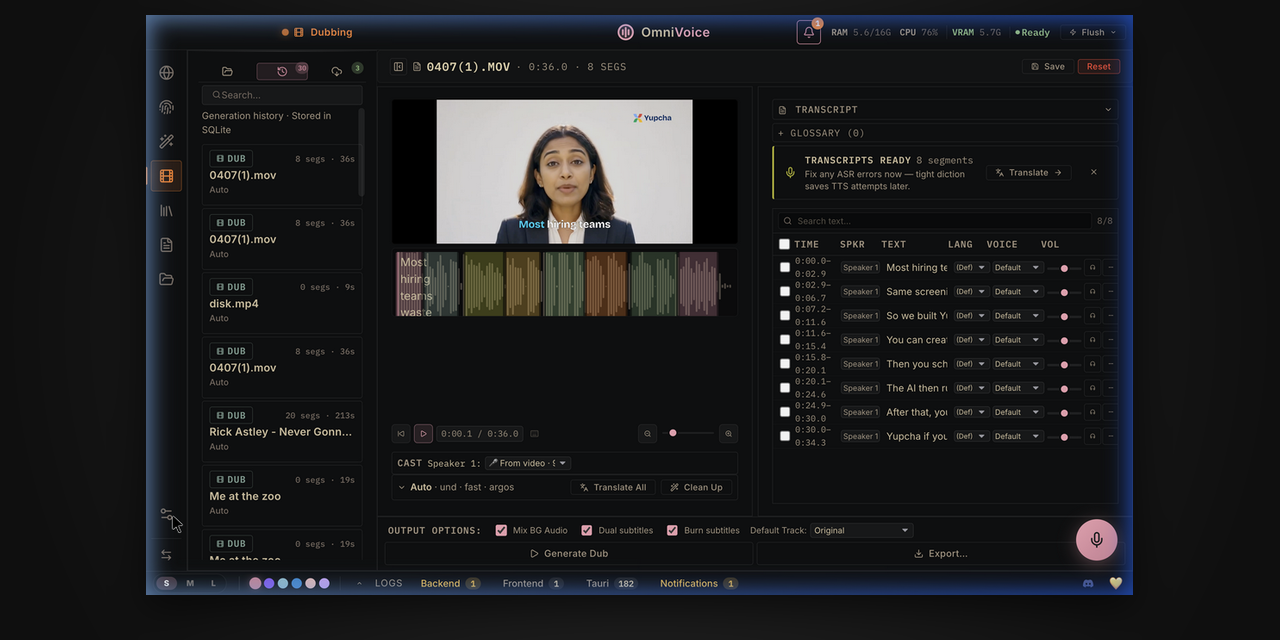
OmniVoice runs entirely on your own hardware (CUDA / MPS / ROCm / CPU auto-detect) — nothing is sent to the cloud. This image is the headless web-server build: a FastAPI backend serving a pre-built React UI over HTTP, so you can run it on a homelab box, a GPU server, or anywhere Docker runs and open the UI in a browser.
The Tauri desktop app's auto-updater and update-channel toggle are desktop-only and do not apply to this image — to update, pull a newer tag and recreate the container.
What you need: 8 GB RAM (16 GB+ recommended), ~10 GB free disk for model
weights + cache (20 GB+ comfortable), and optionally a GPU — 4 GB VRAM works
(TTS auto-offloads to CPU), 8 GB+ is comfortable. No GPU at all is fine too:
the entire pipeline runs on CPU, just slower. Pull size: ~5 GB compressed
(CUDA/CPU image), ~15 GB for the :rocm variant.
Quick start (CPU)
docker run -d --name omnivoice \
  -p 127.0.0.1:3900:3900 \
  -v omnivoice-data:/app/omnivoice_data \
  -v ~/.cache/huggingface:/root/.cache/huggingface \
  palashdeb/omnivoice-studio:latest
Open http://localhost:3900. The first run downloads a few GB of model weights —
follow docker logs -f omnivoice to watch progress.
Quick start (NVIDIA GPU)
docker run -d --name omnivoice --gpus all \
  -p 127.0.0.1:3900:3900 \
  -v omnivoice-data:/app/omnivoice_data \
  -v ~/.cache/huggingface:/root/.cache/huggingface \
  palashdeb/omnivoice-studio:latest
GPU mode needs the NVIDIA Container Toolkit on the host.
Quick start (AMD GPU / ROCm)
AMD GPUs use the dedicated :rocm image variant (the default image is
CUDA-only and runs on CPU on AMD hardware). No toolkit needed — pass the GPU
through as device nodes; the host only needs the amdgpu kernel driver:
docker run -d --name omnivoice \
  --device /dev/kfd --device /dev/dri \
  -p 127.0.0.1:3900:3900 \
  -v omnivoice-data:/app/omnivoice_data \
  -v ~/.cache/huggingface:/root/.cache/huggingface \
  palashdeb/omnivoice-studio:rocm
Podman users: same two --device flags (Quadlet: AddDevice=/dev/kfd +
AddDevice=/dev/dri). On RDNA3 consumer cards (RX 7900 XTX/XT), add
-e HSA_OVERRIDE_GFX_VERSION=11.0.0 if the GPU isn't detected — details in
the Docker install guide.
There's also a Compose file in the repo with cpu / gpu / rocm profiles
— see the Docker install guide.
Image tags
| Tag | What you get |
|---|---|
:latest |
Rolling preview — latest commit on main, at or ahead of the last release. This is the preview channel; pin :stable for production. |
:stable |
Most recent versioned release (updated on every v* git tag) |
:0.4.0 |
Exact release version |
:0.4 |
Latest patch within the 0.4 minor |
:main |
Alias of the same rolling main build as :latest |
:sha-xxxxxxx |
A specific commit (produced by manual workflow dispatch) |
:rocm |
AMD GPU (ROCm) build of the rolling preview — the ROCm analogue of :latest |
:stable-rocm, :0.4.0-rocm, :0.4-rocm, :sha-xxxxxxx-rocm |
ROCm builds of the corresponding tags above |
Preview builds always come from main and never version-sort below :stable,
so upgrades flow naturally. The same images and tags
are mirrored on GHCR at
ghcr.io/debpalash/omnivoice-studio.
What's inside
- 🎙️ Voice Cloning — a 3-second clip mirrors any voice, zero-shot, in 646 languages.
- 🎨 Voice Design — dial in gender, age, accent, pitch, speed, emotion, and dialect.
- 🎬 Video Dubbing — YouTube URL or file → transcribe → translate → re-voice → MP4.
- 📖 Audiobook & long-form — script → plan → loudness-normalized M4B with chapters, metadata, and cover art.
- 🔊 Vocal Isolation — Demucs splits speech from music and keeps the background.
- 👥 Speaker Diarization — Pyannote + WhisperX auto-identify who said what.
- 📦 Batch Queue — drop 50 videos and walk away; per-job progress.
- 🤖 MCP Server — drive OmniVoice from Claude, Cursor, or any MCP client.
- 🛡️ AI Watermark — invisible AudioSeal (Meta) marking that survives compression.
- ⚡ GPU Auto-Detect — CUDA · MPS · ROCm · CPU, with auto-offload on ≤8 GB cards.
- 🧩 Extensible — subclass
TTSBackendto add any engine in ~50 lines.
Multiple TTS engines ship out of the box (IndexTTS, CosyVoice, Supertonic-3, and more), auto-detected and selectable in Settings.
Volumes worth persisting
| Mount | Purpose |
|---|---|
omnivoice-data:/app/omnivoice_data |
Project DB, user voices, settings, encrypted HF token — survives upgrades |
~/.cache/huggingface:/root/.cache/huggingface |
HF model cache — reuse the host cache to skip multi-GB re-downloads |
Configuration & networking
- The container binds uvicorn to
0.0.0.0internally; the host-side127.0.0.1:3900:3900mapping is what keeps it loopback-only. Change the mapping to0.0.0.0:3900:3900for LAN access. - Behind a reverse proxy on a different origin, set
-e OMNIVOICE_PUBLIC_API_BASE=https://api.your-host.exampleso the UI targets the right API base (works on the prebuilt image; no rebuild needed). - The image ships with
OMNIVOICE_SERVER_MODE=1, which relaxes the desktop-only loopback-origin gate so the admin UI works through Docker's NAT. Set it to0if you front the container with your own loopback auth proxy.
Security: OmniVoice ships no authentication. Anything that can reach the URL can use the app. Before exposing it beyond localhost, put it behind a reverse proxy with auth (Caddy
basic_auth, nginx + htpasswd) or a private overlay (Tailscale, ZeroTier).
Links
- Source & full install docs: https://github.com/debpalash/OmniVoice-Studio
- Docker guide: https://github.com/debpalash/OmniVoice-Studio/blob/main/docs/install/docker.md
- Troubleshooting: https://github.com/debpalash/OmniVoice-Studio/blob/main/docs/install/troubleshooting.md
- Community / support: Discord
OmniVoice Studio is in active beta and licensed under AGPL-3.0.