ChatGPT Exporter

## Un script GreasyFork pour exporter l'historique de chat de [ChatGPT](https://chatgpt.com/) [![license][license-image]][license-url] [![release][release-image]][release-url] [![GreasyFork][GreasyFork-image]][GreasyFork-url] [license-image]: https://img.shields.io/github/license/pionxzh/chatgpt-exporter?color=red [license-url]: https://github.com/pionxzh/chatgpt-exporter/blob/master/LICENSE [release-image]: https://img.shields.io/github/v/release/pionxzh/chatgpt-exporter?color=blue [release-url]: https://github.com/pionxzh/chatgpt-exporter/releases/latest [GreasyFork-image]: https://img.shields.io/static/v1?label=%20&message=GreasyFork&style=flat-square&labelColor=7B0000&color=960000&logo=data:image/png;base64,iVBORw0KGgoAAAANSUhEUgAAABAAAAAQCAYAAAAf8/9hAAAABmJLR0QA/wD/AP+gvaeTAAAACXBIWXMAAAsTAAALEwEAmpwYAAAAB3RJTUUH3ggEBCQHM3fXsAAAAVdJREFUOMudkz2qwkAUhc/goBaGJBgUtBCZyj0ILkpwAW7Bws4yO3AHLiCtEFD8KVREkoiFxZzX5A2KGfN4F04zMN+ce+5c4LMUgDmANYBnrnV+plBSi+FwyHq9TgA2LQpvCiEiABwMBtzv95RSfoNEHy8DYBzHrNVqVEr9BWKcqNFoxF6vx3a7zc1mYyC73a4MogBg7vs+z+czO50OW60Wt9stK5UKp9Mpj8cjq9WqDTBHnjAdxzGQZrPJw+HA31oulzbAWgLoA0CWZVBKIY5jzGYzdLtdE9DlcrFNrY98zobqOA6TJKHW2jg4nU5sNBpFDp6mhVe5rsvVasUwDHm9Xqm15u12o+/7Hy0gD8KatOd5vN/v1FozTVN6nkchxFuI6hsAAIMg4OPxMJCXdtTbR7JJCMEgCJhlGUlyPB4XfumozInrupxMJpRSRtZlKoNYl+m/6/wDuWAjtPfsQuwAAAAASUVORK5CYII= [GreasyFork-url]: https://greasyfork.org/scripts/456055-chatgpt-exporter [English](./README.md)   |   Français   |   [Indonesia](./README_ID.md)   |   [한국어](./README_KR.md)   |   [Türkçe](./README_TR.md) ![image](https://github.com/pionxzh/chatgpt-exporter/assets/9910706/1c864670-7912-4484-b4be-bdf5dde51557) ## Installation ### Prérequis Installez `Tampermonkey` [Chrome][link-chrome]    [Firefox][link-firefox]    [Edge][link-edge] [link-chrome]: https://chrome.google.com/webstore/detail/tampermonkey/dhdgffkkebhmkfjojejmpbldmpobfkfo 'Chrome Web Store' [link-firefox]: https://addons.mozilla.org/firefox/addon/tampermonkey 'Modules Firefox' [link-edge]: https://microsoftedge.microsoft.com/addons/detail/tampermonkey/iikmkjmpaadaobahmlepeloendndfphd 'Modules Edge' ### Script Utilisateur | Greasyfork | GitHub | | --------------------------------------------------------------------------------- | -------------------------------------------------------------------------------------------- | | [![Installer][Install-1-image]][install-1-url] | [![Installer][Install-2-image]][install-2-url] | [Install-1-image]: https://img.shields.io/badge/-Installer-blue [Install-1-url]: https://greasyfork.org/scripts/456055-chatgpt-exporter [Install-2-image]: https://img.shields.io/badge/-Installer-blue [Install-2-url]: https://raw.githubusercontent.com/pionxzh/chatgpt-exporter/master/dist/chatgpt.user.js # [📚 Formats Supportés](#-formats-supportés)   |   [💡 Exemple](#-exemple)   |   [📤 Exporter Plusieurs Conversations](#-exporter-plusieurs-conversations)   |   [🤝 Contribution](#-contribution)   |   [⭐ Historique des Étoiles](#-historique-des-étoiles)
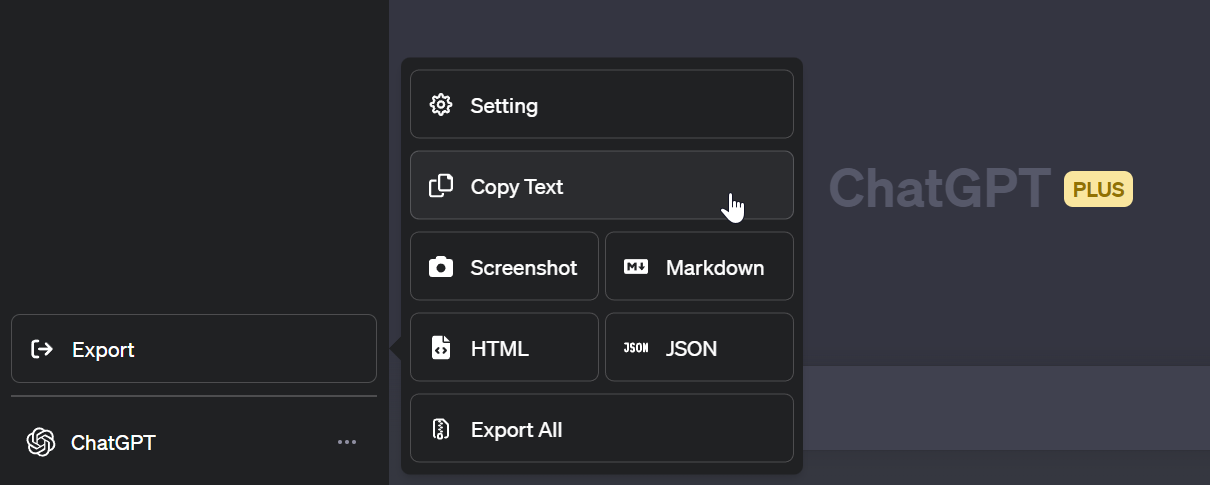
# ## 📚 Formats Supportés - [Texte](#texte) - [HTML](#html) - [Markdown](#markdown) - [PNG](#capture-décran) - [JSON](#json) ## 💡 Exemple ### Texte ``` Vous : Je crée un ChatGPT Exporter. Qu'en pensez-vous ? ChatGPT : On dirait que vous prévoyez de créer un outil qui utilise le modèle ChatGPT pour exporter du texte. ChatGPT est un grand modèle de langage entraîné par OpenAI qui est conçu pour générer des réponses textuelles semblables à des réponses humaines à partir d'une entrée donnée. Il peut être utilisé pour diverses applications, telles que des chatbots, des réponses automatisées aux demandes des clients, et plus encore. Cependant, gardez à l'esprit qu'en tant que grand modèle de langage, ChatGPT n'a pas été spécifiquement entraîné pour une tâche précise, la qualité du texte généré dépendra donc de son utilisation et du contexte dans lequel il est appliqué. Il est important d'utiliser ChatGPT de manière responsable et de considérer les conséquences potentielles de son utilisation dans n'importe quelle situation. ``` ### HTML
image
### Markdown ``` --- titre : Création de ChatGPT Exporter source : https://chat.openai.com/c/cf3f8850-1d69-43c8-b99b-affd0de4e76f auteur : ChatGPT --- # Création de ChatGPT Exporter #### Vous : Je crée un ChatGPT Exporter. Qu'en pensez-vous ? #### ChatGPT : On dirait que vous prévoyez de créer un outil qui utilise le modèle ChatGPT pour exporter du texte. ChatGPT est un grand modèle de langage entraîné par OpenAI qui est conçu pour générer des réponses textuelles semblables à des réponses humaines à partir d'une entrée donnée. ``` ### Capture d'écran
### JSON Le contenu brut de l'API `https://chat.openai.com/backend-api/conversation/[id]`
Cliquez pour voir ```json { "id": "35a1fa05-e928-4c39-8ffa-ca74f75b509f", "title": "AI Turing Test.", "create_time": 1678015311.655875, "mapping": { "5c48fa3e-e4ee-4d00-aa66-8fbcb671a358": { "id": "5c48fa3e-e4ee-4d00-aa66-8fbcb671a358", "message": { "id": "5c48fa3e-e4ee-4d00-aa66-8fbcb671a358", "author": { "role": "system", "metadata": {} }, "create_time": 1678015311.655875, "content": { "content_type": "text", "parts": [ "" ] }, "end_turn": true, "weight": 1, "metadata": {}, "recipient": "all" }, "parent": "9310b90f-d8f0-4be6-bac2-daacddac784f", "children": [ "4afb9720-3a88-49b1-9309-e2b53d607f34" ] }, "9310b90f-d8f0-4be6-bac2-daacddac784f": { "id": "9310b90f-d8f0-4be6-bac2-daacddac784f", "children": [ "5c48fa3e-e4ee-4d00-aa66-8fbcb671a358" ] }, "4afb9720-3a88-49b1-9309-e2b53d607f34": { "id": "4afb9720-3a88-49b1-9309-e2b53d607f34", "message": { "id": "4afb9720-3a88-49b1-9309-e2b53d607f34", "author": { "role": "user", "metadata": {} }, "create_time": 1678015311.656259, "content": { "content_type": "text", "parts": [ "write an poem about the Turing test" ] }, "weight": 1, "metadata": { "timestamp_": "absolute" }, "recipient": "all" }, "parent": "5c48fa3e-e4ee-4d00-aa66-8fbcb671a358", "children": [ "7027f1a5-8bd5-4463-9869-8a1d1db2f9a1" ] }, "7027f1a5-8bd5-4463-9869-8a1d1db2f9a1": { "id": "7027f1a5-8bd5-4463-9869-8a1d1db2f9a1", "message": { "id": "7027f1a5-8bd5-4463-9869-8a1d1db2f9a1", "author": { "role": "assistant", "metadata": {} }, "create_time": 1678185638.890551, "content": { "content_type": "text", "parts": [ "In the realm of machines and code,\nThere lies a test, with rules bestowed,\nA challenge to determine true mind,\nAnd if a machine's intelligence can find.\n\nThe Turing test, named for its creator,\nSeeks to find if a machine's behavior\nCan mimic that of a human so well,\nThat it's indistinguishable, can you tell?\n\nThrough conversations, the test is done,\nWith a judge and a machine, the game is run,\nIf the judge can't tell who is who,\nThen the machine's intelligence shines through.\n\nBut can a machine truly think?\nOr is it just a clever bit of link,\nBetween algorithms and programming code,\nCan it truly understand and decode?\n\nThe Turing test, a thought experiment,\nBrings up questions, doubts, and sentiment,\nFor as we strive to create machines smart,\nWe wonder, will they ever truly have heart?\n\nSo let us ponder and explore,\nAs we create machines more and more,\nThe Turing test a reminder to be,\nMindful of what our machines can truly see." ] }, "end_turn": false, "weight": 1, "metadata": { "model_slug": "text-davinci-002-render-sha", "finish_details": { "type": "stop" }, "timestamp_": "absolute" }, "recipient": "all" }, "parent": "4afb9720-3a88-49b1-9309-e2b53d607f34", "children": [] } }, "moderation_results": [], "current_node": "7027f1a5-8bd5-4463-9869-8a1d1db2f9a1" } ```
## 📤 Exporter Plusieurs Conversations Lorsque vous cliquez sur le bouton "Tout Exporter", la boîte de dialogue **Exporter les Conversations** s'ouvre. Voici les fonctions accessibles. **Exporter depuis un fichier d'export officiel (conversations.json)** Cliquez sur le bouton d'icône de téléchargement pour télécharger un fichier JSON de conversations, tel que celui téléchargé depuis OpenAI. **Exporter depuis l'API** Dans la liste de toutes vos conversations, sélectionnez celles que vous souhaitez exporter. Cochez la case "Tout Sélectionner" pour exporter toutes vos conversations. Sélectionnez votre format d'exportation dans le menu déroulant en bas à gauche. Vous pouvez choisir parmi les formats suivants : - **Markdown** - **HTML** - **JSON** - **JSON (ZIP)** Cliquez sur le bouton pour effectuer l'action souhaitée. - **Archiver** - Les sessions de chat archivées disparaîtront de la barre latérale et pourront être gérées dans les paramètres de ChatGPT. Voir [#199](https://github.com/pionxzh/chatgpt-exporter/issues/199) pour plus de détails. - **Supprimer** - Supprime les conversations sélectionnées. - **Exporter** - Exporte les conversations sélectionnées dans le format choisi à l'aide du sélecteur de format. ## 🤝 Contribution Voir [CONTRIBUTING.md](./CONTRIBUTING.md) ## ⭐ Historique des Étoiles
Graphique de l'historique des étoiles