 1dad4d9f9f
* Read vector runs that straddle a chunk boundary

Resolve a run into per-chunk parts instead of a single range, borrowing
when it lands in one chunk and copying when it spans two. The read
pipeline schedules one range per read, so a straddling run is read
outside it.

No writer produces such a run yet, so this changes nothing on its own.
It is what a reader needs before one does — including edge and
live-reload readers, which read files a different version wrote.

Co-Authored-By: Claude Opus 5 (1M context) <noreply@anthropic.com>

* Place multivector runs without regard to chunk boundaries

Writers appended a multivector's inner vectors at the end of the row
space unless the run would cross a chunk boundary, in which case they
skipped the chunk tail — the batch writers padding the skipped rows with
explicit zero rows. That made chunk geometry part of the interface every
multivector storage had to reuse.

Runs now go at the end unconditionally and the chunked storage splits
the write across chunks, as it already did for a batch of single
vectors.

What is left of the geometry is a size cap: a multivector may not exceed
one chunk. It is fill-independent, so it constrains nothing about
placement, and it is what the volatile storage needs anyway — that one
returns a plain slice and so cannot serve a straddling run.

Co-Authored-By: Claude Opus 5 (1M context) <noreply@anthropic.com>

* Split a run at chunk boundaries in one place

Reading, writing in place and appending each derived the split from
`remaining_chunk_capacity`, so every one of them had to know that a run
does not necessarily fit where it starts.

`split_run` hands out the parts instead: one per chunk the run covers,
each carrying where it goes and how much of the run it takes. Nothing
asks how much room is left any more, and `get_chunk_offset` goes with it.

Co-Authored-By: Claude Opus 5 (1M context) <noreply@anthropic.com>

* Keep straddling runs on the read pipeline

Reading a straddling run outside the pipeline blocked the scheduling
loop on one read, which costs a round trip on a backend that fetches
remotely and drops the batch back to sequential.

A run is now scheduled as one read per chunk it covers. Parts complete
in any order, so each run holds what has landed until the last part
does, then hands the callback the stitched vectors. Runs taking a single
read carry the caller's data in the tag and never touch that table.

Co-Authored-By: Claude Opus 5 (1M context) <noreply@anthropic.com>

* Stop capping a multivector at one chunk

The cap outlived its reason on disk, but the volatile storage still
needed it: its `get_many` handed out a slice of one chunk, so a run that
crossed a boundary had nowhere to come from. And since a volatile
storage is a target of the batched copy that builds a segment, dropping
the cap only on disk would have turned a rejected write into a failed
merge.

So the volatile storage splits and stitches too. Both are a few lines
each, and placing a run no longer skips a chunk tail, so `extend` is now
`insert_many` at the end of the storage.

Nothing user-facing moves: `MAX_MULTIVECTOR_FLATTENED_LEN` caps a
multivector at 1M elements, far inside a 32 MiB chunk, so the storages
only ever rejected what reached them unvalidated.

Co-Authored-By: Claude Opus 5 (1M context) <noreply@anthropic.com>

* Schedule a single-read run without the queue

The scheduling loop resolved every run into the queue and then took it
straight back out, so the overwhelmingly common run — one that fits a
chunk — paid a push and a pop for nothing. It now goes to the pipeline
directly, and the queue holds only what a straddling run leaves behind.

Worth ~10% on the multivector read benchmark, and it collapses the
"top up, then take" pair into one decision. Extracting that bookkeeping
into helpers instead was measured and is much worse: the mmap pipeline
alternates one schedule with one wait, so the loop body is a few dozen
nanoseconds, and a helper carrying the cold map and stitching paths is
too big for the compiler to inline back into it.

Co-Authored-By: Claude Opus 5 (1M context) <noreply@anthropic.com>

* Repoint the multivector WAL-replay test at a live rejection

The test upserted a multivector too large for a storage chunk, which no
longer fails: the storages stopped capping one at a chunk. Nothing else
covered a multivector operation that only the apply path rejects.

A raw blob that is not a whole number of quantized records still does,
so the test now uses that, alongside its dense and sparse siblings.

Co-Authored-By: Claude Opus 5 (1M context) <noreply@anthropic.com>

* Test reading multivectors with legacy chunk-tail padding

Locks the compatibility contract that pre-straddle files — runs that
skip a chunk's leftover slots — still reopen as single-chunk borrows.

* chore: retrigger CI after flaky test-consensus-compose

* Move ReadTag into for_each_vector, its only user

Co-Authored-By: Claude Fable 5 <noreply@anthropic.com>
Claude-Session: https://claude.ai/code/session_01AN4Hgbd65gDhesthJk5bUY

---------

Co-authored-by: Claude Opus 5 (1M context) <noreply@anthropic.com>
Co-authored-by: qdrant-cloud-bot <111755117+qdrant-cloud-bot@users.noreply.github.com>

Vector Search Engine for the next generation of AI applications






Qdrant (read: quadrant) is a vector similarity search engine and vector database. It provides a production-ready service with a convenient API to store, search, and manage points—vectors with an additional payload. Qdrant is tailored for extended filtering support, making it useful for all sorts of neural-network or semantic-based matching, faceted search, and other applications.
Qdrant is written in Rust 🦀, which makes it fast and reliable even under high load. See benchmarks.
With Qdrant, embeddings or neural network encoders can be turned into full-fledged applications for matching, searching, recommending, and much more!
Qdrant is also available as a fully managed Qdrant Cloud ⛅ including a free tier.
Quick Start • Agent Skills • Client Libraries • Demo Projects • Integrations • Contact
Getting Started
Agent Skills
Qdrant provides a collection of ready-to-use agent skills that bring Qdrant's vector search capabilities directly into your AI coding assistant. Install these skills to empower your agent in making critical engineering decisions for optimal vector search performance, such as quantization, sharding, tenant isolation, hybrid search, model migration, and more.
Client-Server
To experience the full power of Qdrant locally, run the container with this command:
docker run -p 6333:6333 qdrant/qdrant
Note that this starts an insecure deployment without authentication, open to all network interfaces. Please refer to secure your instance.
Now you can connect to the server with any client. For example, using Python:
from qdrant_client import QdrantClient

client = QdrantClient(url="http://localhost:6333")
Before deploying Qdrant to production, be sure to read our installation and security guides.
Clients
Qdrant offers the following client libraries to help you integrate it into your application stack:
- Official:
- Community:
Qdrant Edge
Qdrant Edge is a lightweight version of Qdrant designed for edge devices and resource-constrained environments. Unlike Qdrant Server, which uses a client-server architecture, Qdrant Edge runs inside the application process. Data is stored and queried locally and can be synchronized with a Qdrant server. It offers the same powerful vector search capabilities as the client-server version but with a smaller footprint, making it ideal for applications that require low latency and offline functionality.
To get started with Qdrant Edge from Python or Rust, initialize an instance of EdgeShard, which exposes methods to manage data, query it, and restore snapshots. For example:
from qdrant_edge import Distance, EdgeConfig, EdgeVectorParams, EdgeShard, Point, UpdateOperation

shard = EdgeShard.create("./shard", EdgeConfig(
    vectors={"my-vector": EdgeVectorParams(size=4, distance=Distance.Cosine)}
))
shard.update(UpdateOperation.upsert_points([
    Point(id=1, vector={"my-vector": [0.1, 0.2, 0.3, 0.4]}, payload={"color": "red"})
]))
Where Do I Go from Here?
- Quick Start Guide
- Detailed Documentation
- Take the Qdrant Essentials course
- Follow this tutorial to create a semantic search engine with Qdrant
Demo Projects
Discover Semantic Text Search 🔍
Unlock the power of semantic embeddings with Qdrant, transcending keyword-based search to find meaningful connections in short texts. Deploy a neural search in minutes using a pre-trained neural network, and experience the future of text search. Try it online!
Explore Similar Image Search - Food Discovery 🍕
There's more to discovery than text search, especially when it comes to food. People often choose meals based on appearance rather than descriptions and ingredients. Let Qdrant help your users find their next delicious meal using visual search, even if they don't know the dish's name. Check it out!
Master Extreme Classification - E-Commerce Product Categorization 📺
Enter the cutting-edge realm of extreme classification, an emerging machine learning field tackling multi-class and multi-label problems with millions of labels. Harness the potential of similarity learning models, and see how a pre-trained transformer model and Qdrant can revolutionize e-commerce product categorization. Play with it online!
API
REST
Qdrant provides a REST API with an OpenAPI 3.0 specification, enabling client generation for virtually any framework or programming language.
You can also download the raw OpenAPI definitions.
gRPC
For faster, production-tier searches, Qdrant also provides a gRPC interface.
Features
Dense, Sparse, and Multi Vector Search
Qdrant supports dense vectors for semantic similarity, sparse vectors for full-text search, and multivector search for objects with multiple embeddings or late interaction models like ColBERT.
Filtering on Payload
Attach any JSON payload to your vectors and filter on it using a rich set of conditions—keyword matching, full-text, numeric ranges, geo-locations, and more—combined with should, must, and must_not clauses.
Hybrid Search
Combine multiple vectors in a single query to get the best of semantic understanding and keyword precision, with results merged via configurable fusion strategies, such as Reciprocal Rank Fusion (RRF) and Distribution-Based Score Fusion (DBSF).
Vector Quantization and On-Disk Storage
Built-in quantization cuts RAM usage by up to 97% and lets you tune the trade-off between search speed and precision.
Distributed Deployment
Scale horizontally with sharding and replication, and update or resize collections with zero downtime.
Highlighted Features
- Faceting - aggregate search results by payload values.
- Recommendation - use positive and negative examples to find similar points.
- Discovery - constrain search to a specific region of the vector space.
- Search Relevance Tuning - tools for adjusting search results, such as Maximal Marginal Relevance (MMR) and the Relevance Feedback Query.
- Multitenancy - scalable partitioning of data for multi-user environments.
- Observability - comprehensive metrics, telemetry, and audit logging for monitoring and debugging.
- Query Planning and Payload Indexes - leverages stored payload information to optimize query execution strategy.
- SIMD Hardware Acceleration - utilizes modern CPU x86-x64 and Neon architectures to deliver better performance.
- GPU Support - for accelerated indexing, with support for NVIDIA and AMD GPUs.
- Async I/O - uses
io_uringto maximize disk throughput utilization even on network-attached storage. - Write-Ahead Logging - ensures data persistence with update confirmation, even during power outages.
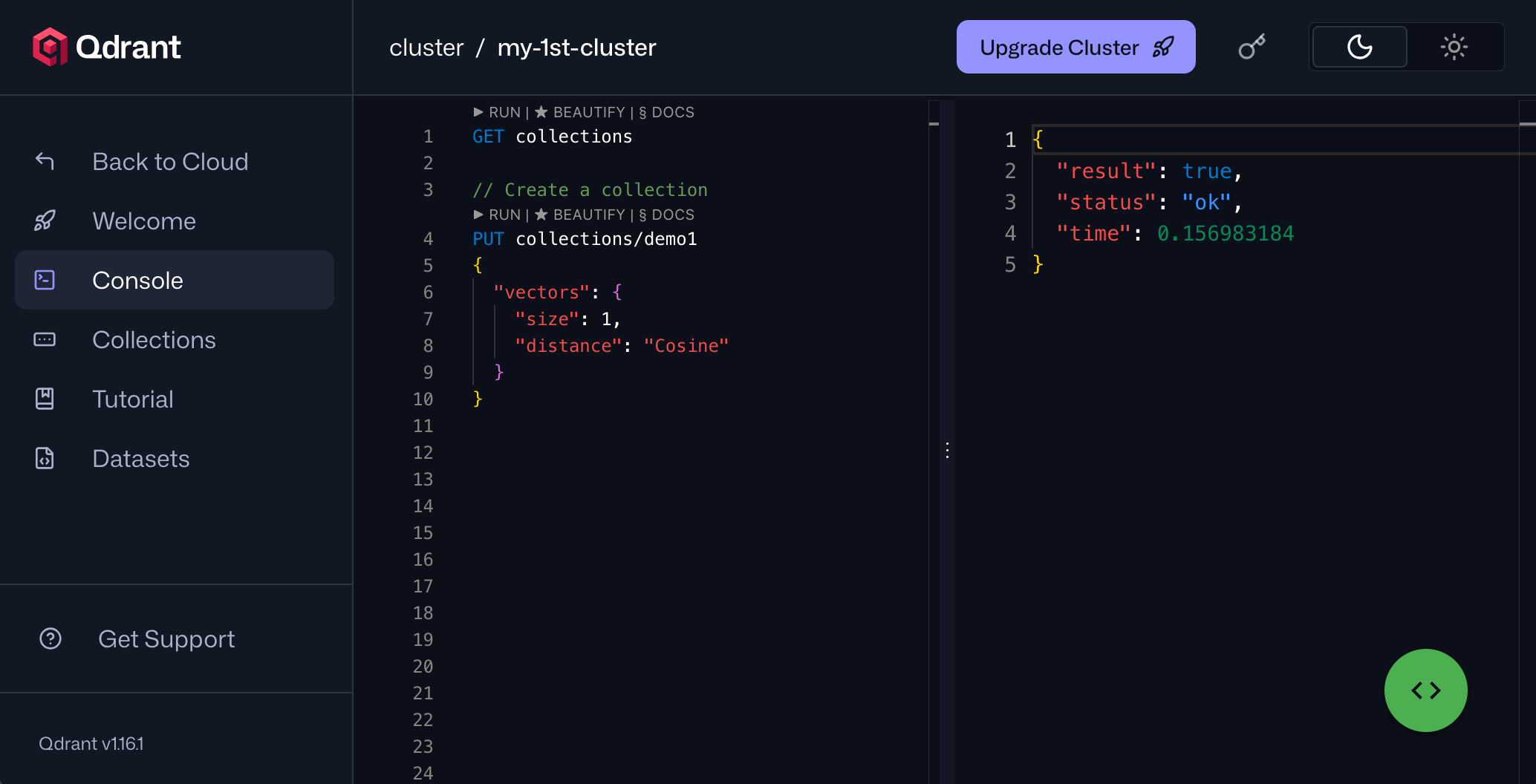
Web UI
Web UI provides a visual way to interact with your data and monitor the health of your deployment. It enables you to explore your collections, manage data, interact with the REST API, and more.
Integrations
Qdrant integrates with the tools you're already using across every stage of your AI stack. You can connect to embedding providers, AI application frameworks, and data pipeline tools, as well as observability platforms for monitoring and tracing your vector search in production. No-code and low-code automation platforms are supported too. Refer to the Ecosystem page for the complete list.
Contributing
We are happy to receive your contributions! Before opening a pull request, please read our Contributing Guide.
Important
Our development branch is
dev, notmaster. Please fork the repo, branch fromdev, and open your pull request againstdev. PRs targetingmasterwill be asked to retarget.
Contacts
- Have questions? Join our Discord channel or mention @qdrant_engine on X
- Want to stay in touch with the latest releases? Subscribe to our Newsletters
- Looking for a managed cloud? Check pricing. Need something personalized? We're at info@qdrant.tech
License
Qdrant is licensed under the Apache License, Version 2.0. View a copy of the License file.