 b3fc4dfe4e
* Add mincore-based memory stats to MmapFile

Add `resident_bytes()`, `disk_bytes()`, and `probe_memory_stats()` methods
to `MmapFile` for measuring page cache residency via `mincore(2)`. This is
the foundation for per-collection memory usage reporting.

Also extract `page_size()` as a public function in `mmap::advice`, replacing
the internal `PAGE_SIZE_MASK` with a direct page size cache.

Co-Authored-By: Claude Opus 4.6 (1M context) <noreply@anthropic.com>

* [AI] introduce trait for reporting memory usage per component

* [AI] memory reporter implementation for vector storage

* [AI] implement MemoryReporter for QuantizedVectors

* [AI] implement MemoryReporter for VectorIndexEnum

* Implement MemoryReporter for IdTrackerEnum with RAM estimation

Add ram_usage_bytes() to all ID tracker types and their data structures:
- PointMappings, CompressedPointMappings, CompressedVersions,
  CompressedInternalToExternal, CompressedExternalToInternal
- MutableIdTracker, ImmutableIdTracker, InMemoryIdTracker

All ID trackers load their data into RAM (none use mmap for working data).
Files are reported as OnDisk (persistence only), actual RAM footprint
is reported via extra_ram_bytes. Uses struct destructuring to ensure
new fields trigger compile errors if not accounted for.

Co-Authored-By: Claude Opus 4.6 (1M context) <noreply@anthropic.com>

* [AI] implement MemoryReporter for PayloadStorageEnum and adjust FileStorageIntent

* [AI] implement MemoryReporter for PayloadStorageEnum and adjust FileStorageIntent

* [AI] implement MemoryReporter for payload indexes: in-ram structures memory consumtion computation + caching

* [AI] implement MemoryReporter for payload indexes: in-ram structures memory consumtion computation + caching

* [AI] segment-level memory usage report

* [AI] Block 3: Aggregation Layer and Data Model + internal api for remote shard

* [AI] REST API handler

* fmt

* [AI] clippy fixes

* [AI] macos fix + proxy segment fix

* [AI] make text index estimation a bit more correct

* fix is_on_disk reporting for dense_vector_storage

* fix after rebase

* [AI] deep account for quantized vectors RAM usage + unify chunk size + shring volatile storage after load

* remove debug log

* cache in test

* make manual test easier to run

* rollback chunk size diff, but keep it for test only

* review fixes

* Use exhaustive match

* Use div_ceil on bits everywhere

It does not seem to be strictly necessary because the number of bits
should already be a multiple of the used container size bytes. Still
it's good practice to be careful with this calculation.

* Improve heap size bytes for encoded product quantization vectors

* Include vector stats for binary quantized vectors

* In volatile chunked vectors, include heap allocated vector

* Include rest of heap allocated structures for mutable map index

* In mutable geo index, the hash map is also heap allocated

* Update tests/manual/test_memory_reporting.py

Co-authored-by: coderabbitai[bot] <136622811+coderabbitai[bot]@users.noreply.github.com>

---------

Co-authored-by: Claude Opus 4.6 (1M context) <noreply@anthropic.com>
Co-authored-by: timvisee <tim@visee.me>
Co-authored-by: Tim Visée <tim+github@visee.me>
Co-authored-by: coderabbitai[bot] <136622811+coderabbitai[bot]@users.noreply.github.com>

Vector Search Engine for the next generation of AI applications






Qdrant (read: quadrant) is a vector similarity search engine and vector database. It provides a production-ready service with a convenient API to store, search, and manage points—vectors with an additional payload Qdrant is tailored to extended filtering support. It makes it useful for all sorts of neural-network or semantic-based matching, faceted search, and other applications.
Qdrant is written in Rust 🦀, which makes it fast and reliable even under high load. See benchmarks.
With Qdrant, embeddings or neural network encoders can be turned into full-fledged applications for matching, searching, recommending, and much more!
Qdrant is also available as a fully managed Qdrant Cloud ⛅ including a free tier.
Quick Start • Client Libraries • Demo Projects • Integrations • Contact
Getting Started
Python
pip install qdrant-client
The python client offers a convenient way to start with Qdrant locally:
from qdrant_client import QdrantClient
qdrant = QdrantClient(":memory:") # Create in-memory Qdrant instance, for testing, CI/CD
# OR
client = QdrantClient(path="path/to/db")  # Persists changes to disk, fast prototyping
Client-Server
To experience the full power of Qdrant locally, run the container with this command:
docker run -p 6333:6333 qdrant/qdrant
Caution
Starts an insecure deployment without authentication open to all network interfaces. Please refer to secure your instance.
Now you can connect to this with any client, including Python:
qdrant = QdrantClient("http://localhost:6333") # Connect to existing Qdrant instance
Before deploying Qdrant to production, be sure to read our installation and security guides.
Clients
Qdrant offers the following client libraries to help you integrate it into your application stack with ease:
- Official:
- Community:
Where do I go from here?
- Quick Start Guide
- End to End Colab Notebook demo with SentenceBERT and Qdrant
- Detailed Documentation are great starting points
- Step-by-Step Tutorial to create your first neural network project with Qdrant
Demo Projects
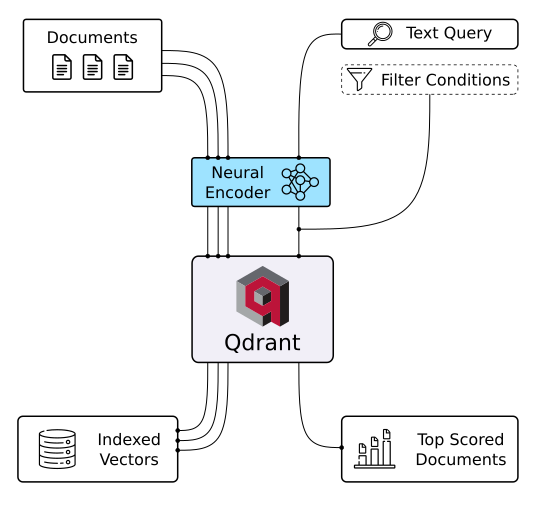
Discover Semantic Text Search 🔍
Unlock the power of semantic embeddings with Qdrant, transcending keyword-based search to find meaningful connections in short texts. Deploy a neural search in minutes using a pre-trained neural network, and experience the future of text search. Try it online!
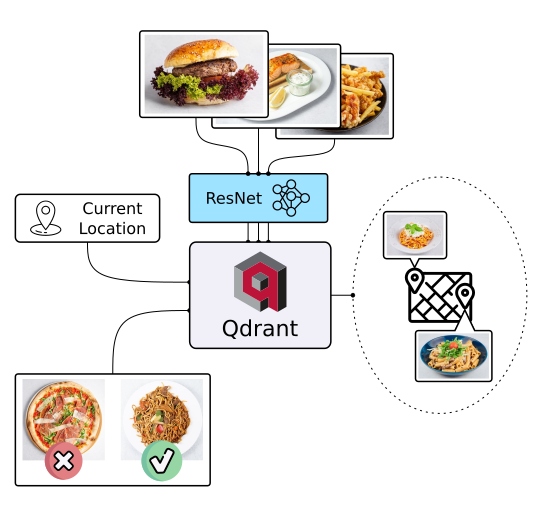
Explore Similar Image Search - Food Discovery 🍕
There's more to discovery than text search, especially when it comes to food. People often choose meals based on appearance rather than descriptions and ingredients. Let Qdrant help your users find their next delicious meal using visual search, even if they don't know the dish's name. Check it out!
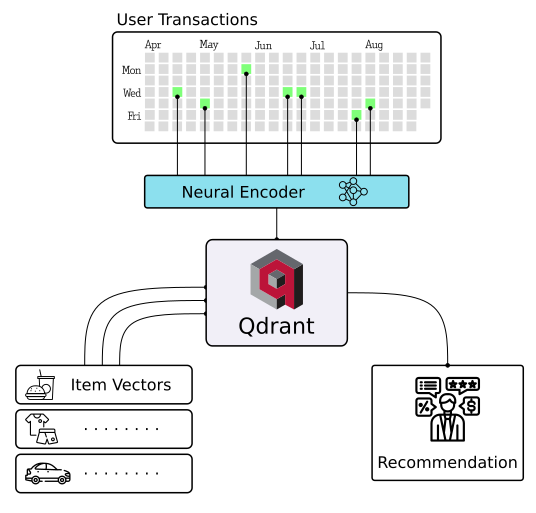
Master Extreme Classification - E-commerce Product Categorization 📺
Enter the cutting-edge realm of extreme classification, an emerging machine learning field tackling multi-class and multi-label problems with millions of labels. Harness the potential of similarity learning models, and see how a pre-trained transformer model and Qdrant can revolutionize e-commerce product categorization. Play with it online!
More solutions
|
|
|
| Semantic Text Search | Similar Image Search | Recommendations |
|
|

|
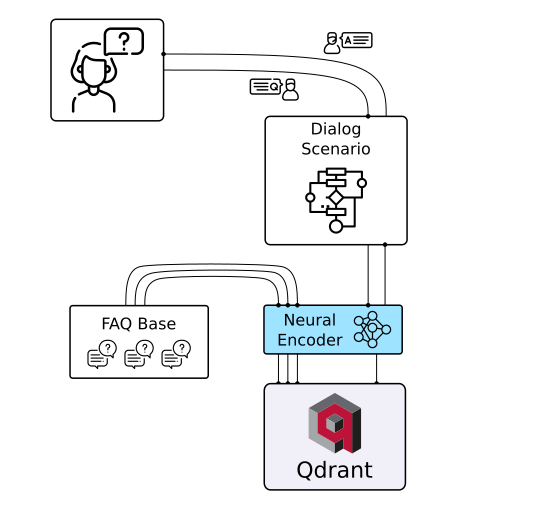
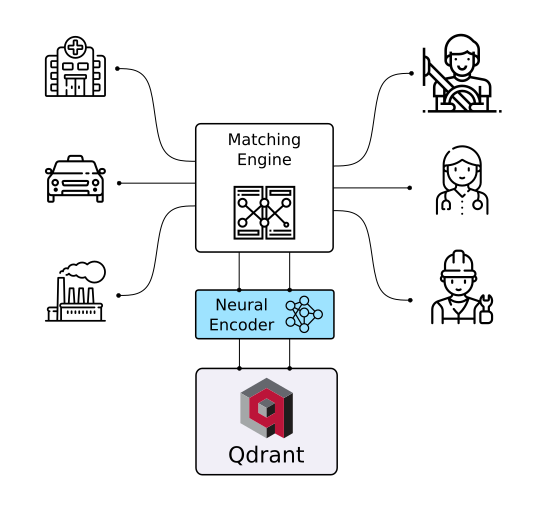
| Chat Bots | Matching Engines | Anomaly Detection |
API
REST
Online OpenAPI 3.0 documentation is available here. OpenAPI makes it easy to generate a client for virtually any framework or programming language.
You can also download raw OpenAPI definitions.
gRPC
For faster production-tier searches, Qdrant also provides a gRPC interface. You can find gRPC documentation here.
Features
Filtering and Payload
Qdrant can attach any JSON payloads to vectors, allowing for both the storage and filtering of data based on the values in these payloads. Payload supports a wide range of data types and query conditions, including keyword matching, full-text filtering, numerical ranges, geo-locations, and more.
Filtering conditions can be combined in various ways, including should, must, and must_not clauses,
ensuring that you can implement any desired business logic on top of similarity matching.
Hybrid Search with Sparse Vectors
To address the limitations of vector embeddings when searching for specific keywords, Qdrant introduces support for sparse vectors in addition to the regular dense ones.
Sparse vectors can be viewed as an generalization of BM25 or TF-IDF ranking. They enable you to harness the capabilities of transformer-based neural networks to weigh individual tokens effectively.
Vector Quantization and On-Disk Storage
Qdrant provides multiple options to make vector search cheaper and more resource-efficient. Built-in vector quantization reduces RAM usage by up to 97% and dynamically manages the trade-off between search speed and precision.
Distributed Deployment
Qdrant offers comprehensive horizontal scaling support through two key mechanisms:
- Size expansion via sharding and throughput enhancement via replication
- Zero-downtime rolling updates and seamless dynamic scaling of the collections
Highlighted Features
- Query Planning and Payload Indexes - leverages stored payload information to optimize query execution strategy.
- SIMD Hardware Acceleration - utilizes modern CPU x86-x64 and Neon architectures to deliver better performance.
- Async I/O - uses
io_uringto maximize disk throughput utilization even on a network-attached storage. - Write-Ahead Logging - ensures data persistence with update confirmation, even during power outages.
Integrations
Examples and/or documentation of Qdrant integrations:
- Cohere (blogpost on building a QA app with Cohere and Qdrant) - Use Cohere embeddings with Qdrant
- DocArray - Use Qdrant as a document store in DocArray
- Haystack - Use Qdrant as a document store with Haystack (blogpost).
- LangChain (blogpost) - Use Qdrant as a memory backend for LangChain.
- LlamaIndex - Use Qdrant as a Vector Store with LlamaIndex.
- OpenAI - ChatGPT retrieval plugin - Use Qdrant as a memory backend for ChatGPT
- Microsoft Semantic Kernel - Use Qdrant as persistent memory with Semantic Kernel
Contributing
We are happy to receive your contributions! Before opening a pull request, please read our Contributing Guide.
Important
Our development branch is
dev, notmaster. Please fork the repo, branch fromdev, and open your pull request againstdev. PRs targetingmasterwill be asked to retarget.
Contacts
- Have questions? Join our Discord channel or mention @qdrant_engine on Twitter
- Want to stay in touch with latest releases? Subscribe to our Newsletters
- Looking for a managed cloud? Check pricing, need something personalised? We're at info@qdrant.tech
License
Qdrant is licensed under the Apache License, Version 2.0. View a copy of the License file.