 Ivan Pleshkov
ec4d42e7f6
Ivan Pleshkov
ec4d42e7f6
add gpu indexing flag

add gpu vector storage time measurement

add chmod flag

build hnsw using gpu

scoring speedup

move gl_GlobalInvocationID to mains

glslc with o flag

fix tests

use gpu atomics instead of multiple runs

enable atomics

add timers

profile search

let shader work while points collection

use generations for visited flags

add gpu init timer

avoid entries download

remove gpu call timers for a while

rename to combined graph builder

move gpu graph builder

restore levels in link access

restore links_map

add gpu start condition

use graph builder links memory

remove mut's

list point ids before processing

download-upload links using methods only

cpu graph builder as separate struct

add cpu threads count

parallel cpu build

single threaded cpu preprocess

try to fix glove accuracy

unsafe Send and Sync for gpu builder

copy graph layers builder instead of moving

remove obsolete mut

fix build

move builders to arc

fix bfb deadlock

move uneccessary clear

run cpu and gpu in separate threads

many vectors storage buffers

debug gpu vector storage

fix vector storage upload bug

add cpu ful graph build

don't use non-ready links for point

try to resolve conflicts while upsert

add indexing unit test for measurements

add test

utilize cpu more efficient

dont clear bhaep

debug gpu runs

try to use vec4 instead of mat4

dump scores count

estimate gpu usage

print usage per run

start using working groups

build shaders for vulkan v1.3

start shaders subgroup

vk instance version 1.3

subgroup vector storage

fix test

nearest heap

nearest heap test

are you happy fmt

add assert to nearest heap test

are you happy fmt

gpu visited flags

start candidates heap

candidates heap push

debug nearest heap

remove subgroupExclusiveMin

fix build

are you happy clippy

remove links dependency from nearest heap

provide input count to nearest test

are you happy fmt

provide ef to shader

are you happy fmt

get subgroup size

move compiled shaders

are you happy fmt

fix workgroups count for vector storage compute test

return true subgroup size

do nearest heap on gpu with partial sorting

remove tmp shader

unite scores and indices

are you happy fmt

gpu nearest sorting

are you happy fmt

fix nearest heap test

links test with subgroups

gpu candidates start

fix candidates sorting

are you happy fmt

fix candidates test on m1 chip

move obsolete and test shaders

start new gpu search context

search context test

fix links uploading

debug hnsw searh on level test

fix gpu hnsw search on level test

move test initialization to separate function

gpu greedy search shader test

test heuristic shader

gpu greedy search test

gpu test heuristic

move greedy search into searcher

start insertion shader

find hnsw patch on gpu

fix gpu patches test

start gpu graph builder

equivalency test

fix layers check

add timers

are you happy fmt

quality test and fix multithreaded bug

debug tests

are you happy fmt

fix levels count and clear links

fix equivalency test

remove obsolete solution

trivial gpu indexing integration

gpu config and skip conflicts for large hnsw

glsl generic vector storage element type

gpu generic vector storage

enable vulkan features for f16 and u8

force_half_precision option

add force f16 test

fix u8 and f16 unit tests

apply generic shaders in hnsw construction

remove conflicts check; start cpu utilization

cpu prebuild

upload first point links to gpu

mark all points in cpu graph as ready

multithreaded cpu and gpu

fix equivalency test

remove cpu links copy

parallel patches clearing

fix multithreaded env

external layers source

more logs to debug cpu+gpu syncronization

clear gpu processed points count

remove some temp logs

fix cpu stop condition bug

new insert vector shader

greedy search returns only ids

download whole layer links

apply new links on gpu directly

update win shader script

parallel links loading

provide memory amount as setting and estimate groups count

start bq

gpu bq test

fix tests

shaders invocations refactor

revert max groups settings

gix build after rebase

fix bug after rebase

upload links to gpu in cpu thread

fix greedy search iteration

atomic checker for conflicts

dump graph changes for debugging

move iterator to separate file

start combined builder refactor

start cpu builder as separate struct

separate gpu and cpu construction

fix tests

fix atomics count bug

upload links to gpu as separate fn

glue cpu and gpu

gpu thread

link points on cpu while gpu is busy

fix gpu bq scoring test

use xor instead of calc it

reallocate with less groups if not enough gpu memory

update compiled shaders

don't use llvm gpu emulator

debug panic if no gpu

remove tmp debug dumping

dockerfile for gpu

customize candidates count

fix gpu storage size

runtime shader compilation

dim as define

nearest heap params as macro

candidates and links capacities as macro

parallel bitonic sort

use bubble sort too

nearest heap as shared

limited shared candidates heap

combine buble and bitonic sorts

one-argumented similarity

cache vector for scoring

dont check candidates overflow

do greedy before search

visited hashtable

Revert "visited hashtable"

This reverts commit 7540d04d3859d02f17908c874927d18076f3eb8e.

use less flushes

bulk sum calculation

Revert "bulk sum calculation"

This reverts commit 6ef78ceb8d6ba7d9bf2077804548df162052c749.

load vector in one read

Revert "load vector in one read"

This reverts commit ea980d0399b90f44638590d40fdbfb1d6ffa9504.

fix build after rebase

fix build after rebase

sq support

simplify bq uploading using constructed quantization

metrics

alignment depends on subgroup size

are you happy fmt

exact flag

use lazy static for device access

remove prints

test reallocation factor

visited flags capacity as a compile time constant

build gpu hnsw for payload blocks

add dynamically sized subgroup size support

fix build

update rust version for nvidia docker

dynamically sized subgroups

start device filter

test device filter

are you happy clippy

devices manager

provide device instead of flag, better locking

partial cpu permit release

free cpus when gpu enabled

use cpu is waiting is disabled

create device only when gpu is enabled

cpu permit release all cases

parallel indices count

provide queue index

small refactor of shader builder

are you happy fmt

quantization params as separate struct

pq refactor

fmt

remove upload_mapped_ptr from gpu buffer

refactor gpu buffer

check buffer range

buffer refactor

refactor pipeline

move shader compiler to instance

refactor context

more refactor

no unwraps in gpu crate

clippy

apply pr changes

are you happy fmt

dont use shaderc in segment

more gpu tests

pq bq tests

provide bq option

fix bq for small dim

bind pq buffers

pq more complex test

cover all storage types by tests

test multi and vectors as iterator

multivectors upload data

multivectors shader

fix multivector tests

refactor shader builder

move storage tests into separate file

move quantization to separate file

refactor gpu vector storage creation

refactor gpu quantization api

dont convert to float when unnecessary

more comments

small upload vectors refactor

fix build after rebase

fix tests after rebase

different vk queue priorities capacity

vectors upload stopper

amd dockerfile

fix build after rebase

Vector Search Engine for the next generation of AI applications






Qdrant (read: quadrant) is a vector similarity search engine and vector database. It provides a production-ready service with a convenient API to store, search, and manage points—vectors with an additional payload Qdrant is tailored to extended filtering support. It makes it useful for all sorts of neural-network or semantic-based matching, faceted search, and other applications.
Qdrant is written in Rust 🦀, which makes it fast and reliable even under high load. See benchmarks.
With Qdrant, embeddings or neural network encoders can be turned into full-fledged applications for matching, searching, recommending, and much more!
Qdrant is also available as a fully managed Qdrant Cloud ⛅ including a free tier.
Quick Start • Client Libraries • Demo Projects • Integrations • Contact
Getting Started
Python
pip install qdrant-client
The python client offers a convenient way to start with Qdrant locally:
from qdrant_client import QdrantClient
qdrant = QdrantClient(":memory:") # Create in-memory Qdrant instance, for testing, CI/CD
# OR
client = QdrantClient(path="path/to/db")  # Persists changes to disk, fast prototyping
Client-Server
To experience the full power of Qdrant locally, run the container with this command:
docker run -p 6333:6333 qdrant/qdrant
Now you can connect to this with any client, including Python:
qdrant = QdrantClient("http://localhost:6333") # Connect to existing Qdrant instance
Before deploying Qdrant to production, be sure to read our installation and security guides.
Clients
Qdrant offers the following client libraries to help you integrate it into your application stack with ease:
- Official:
- Community:
Where do I go from here?
- Quick Start Guide
- End to End Colab Notebook demo with SentenceBERT and Qdrant
- Detailed Documentation are great starting points
- Step-by-Step Tutorial to create your first neural network project with Qdrant
Demo Projects 
Discover Semantic Text Search 🔍
Unlock the power of semantic embeddings with Qdrant, transcending keyword-based search to find meaningful connections in short texts. Deploy a neural search in minutes using a pre-trained neural network, and experience the future of text search. Try it online!
Explore Similar Image Search - Food Discovery 🍕
There's more to discovery than text search, especially when it comes to food. People often choose meals based on appearance rather than descriptions and ingredients. Let Qdrant help your users find their next delicious meal using visual search, even if they don't know the dish's name. Check it out!
Master Extreme Classification - E-commerce Product Categorization 📺
Enter the cutting-edge realm of extreme classification, an emerging machine learning field tackling multi-class and multi-label problems with millions of labels. Harness the potential of similarity learning models, and see how a pre-trained transformer model and Qdrant can revolutionize e-commerce product categorization. Play with it online!
More solutions
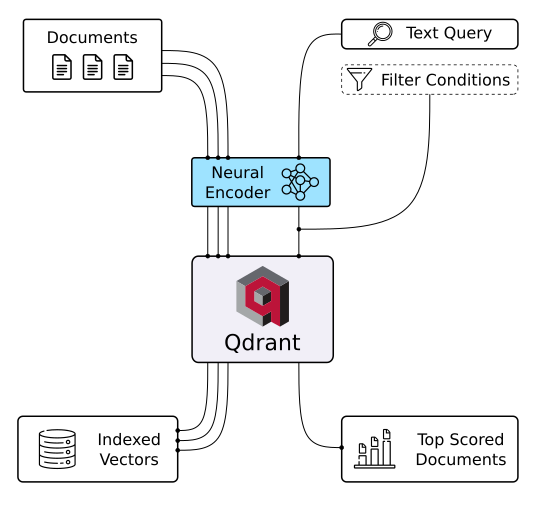
|
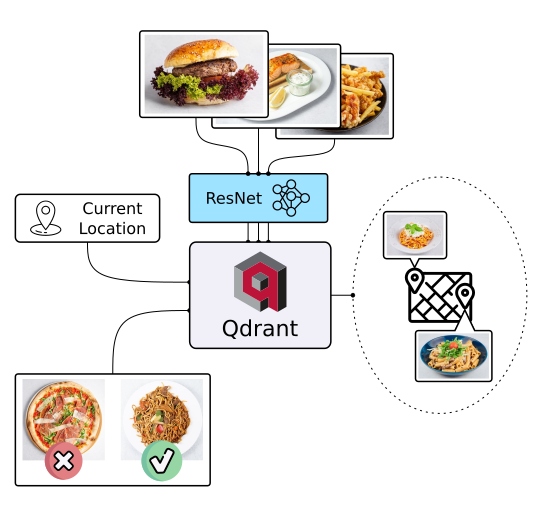
|
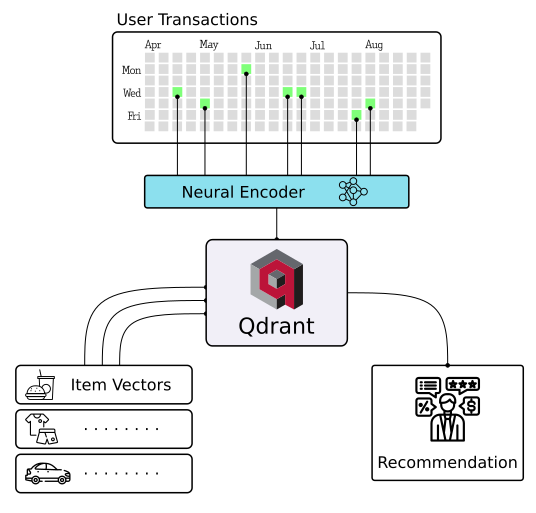
|
| Semantic Text Search | Similar Image Search | Recommendations |
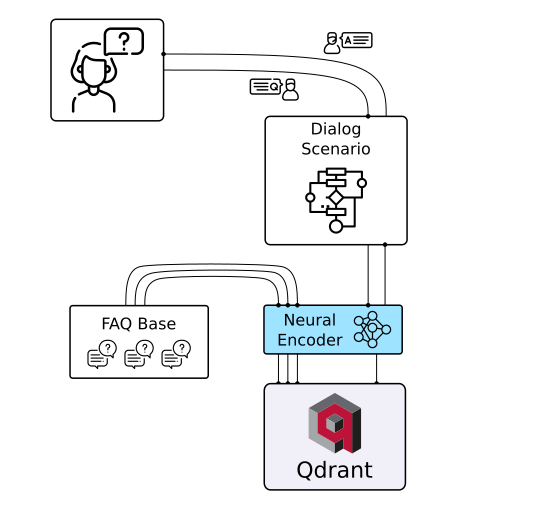
|
|

|
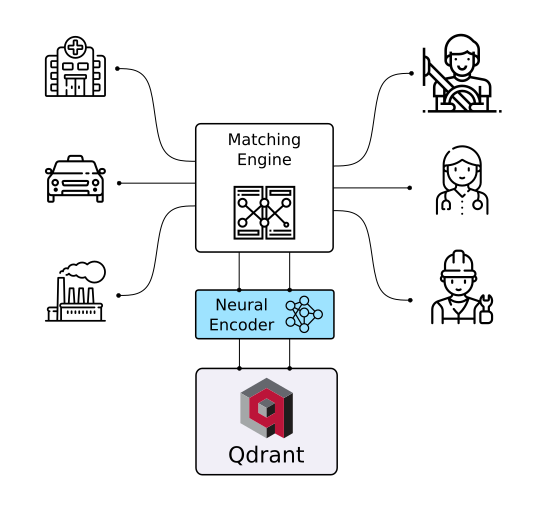
| Chat Bots | Matching Engines | Anomaly Detection |
API
REST
Online OpenAPI 3.0 documentation is available here. OpenAPI makes it easy to generate a client for virtually any framework or programming language.
You can also download raw OpenAPI definitions.
gRPC
For faster production-tier searches, Qdrant also provides a gRPC interface. You can find gRPC documentation here.
Features
Filtering and Payload
Qdrant can attach any JSON payloads to vectors, allowing for both the storage and filtering of data based on the values in these payloads. Payload supports a wide range of data types and query conditions, including keyword matching, full-text filtering, numerical ranges, geo-locations, and more.
Filtering conditions can be combined in various ways, including should, must, and must_not clauses,
ensuring that you can implement any desired business logic on top of similarity matching.
Hybrid Search with Sparse Vectors
To address the limitations of vector embeddings when searching for specific keywords, Qdrant introduces support for sparse vectors in addition to the regular dense ones.
Sparse vectors can be viewed as an generalization of BM25 or TF-IDF ranking. They enable you to harness the capabilities of transformer-based neural networks to weigh individual tokens effectively.
Vector Quantization and On-Disk Storage
Qdrant provides multiple options to make vector search cheaper and more resource-efficient. Built-in vector quantization reduces RAM usage by up to 97% and dynamically manages the trade-off between search speed and precision.
Distributed Deployment
Qdrant offers comprehensive horizontal scaling support through two key mechanisms:
- Size expansion via sharding and throughput enhancement via replication
- Zero-downtime rolling updates and seamless dynamic scaling of the collections
Highlighted Features
- Query Planning and Payload Indexes - leverages stored payload information to optimize query execution strategy.
- SIMD Hardware Acceleration - utilizes modern CPU x86-x64 and Neon architectures to deliver better performance.
- Async I/O - uses
io_uringto maximize disk throughput utilization even on a network-attached storage. - Write-Ahead Logging - ensures data persistence with update confirmation, even during power outages.
Integrations
Examples and/or documentation of Qdrant integrations:
- Cohere (blogpost on building a QA app with Cohere and Qdrant) - Use Cohere embeddings with Qdrant
- DocArray - Use Qdrant as a document store in DocArray
- Haystack - Use Qdrant as a document store with Haystack (blogpost).
- LangChain (blogpost) - Use Qdrant as a memory backend for LangChain.
- LlamaIndex - Use Qdrant as a Vector Store with LlamaIndex.
- OpenAI - ChatGPT retrieval plugin - Use Qdrant as a memory backend for ChatGPT
- Microsoft Semantic Kernel - Use Qdrant as persistent memory with Semantic Kernel
Contacts
- Have questions? Join our Discord channel or mention @qdrant_engine on Twitter
- Want to stay in touch with latest releases? Subscribe to our Newsletters
- Looking for a managed cloud? Check pricing, need something personalised? We're at info@qdrant.tech
License
Qdrant is licensed under the Apache License, Version 2.0. View a copy of the License file.